Mastering the 26 JPGs Jesus Christ Clipart Bundle for Faith-Based Design Projects
Creating meaningful religious content requires more than just good intentions; it demands high-quality visual assets that convey reverence and warmth. The 26 JPGs Jesus Christ Clipart Bundle offers a curated collection of watercolor illustrations designed to bring cozy farmhouse vibes to your creative projects. Whether you are designing baby shower invitations, nursery wall decor, or digital planners, understanding how to properly utilize these files is crucial for achieving professional results. Many creators rush into purchasing digital assets without fully grasping the technical specifications, leading to frustration during the design process. This guide will help you navigate the specifics of this bundle, ensuring you make informed decisions and avoid common pitfalls associated with digital downloads.
Understanding the File Format and Its Implications
One of the most frequent misunderstandings among buyers of digital clipart involves file formats. This specific bundle consists of 26 JPG images with a solid white background. It is vital to note that these are not transparent PNG files. For beginners or those accustomed to working exclusively with vector graphics or transparent layers, this distinction can be surprising. If you attempt to place these images directly onto a colored or patterned background in software like Canva, Photoshop, or Procreate, the white square surrounding the illustration will remain visible. This can disrupt the aesthetic flow of your design, making it look amateurish rather than polished.
To avoid this issue, you must be prepared to digitally edit the images. Removing the white background is a straightforward process in most modern design tools, but it does require an extra step. If you are not comfortable using background removal tools, you should plan your projects accordingly. These illustrations work perfectly on white or light-colored backgrounds where the edge blend is less noticeable. Alternatively, you can use the "magic wand" or "select subject" features in editing software to isolate the watercolor figures. Recognizing this requirement before purchase ensures that you do not feel misled later and allows you to allocate time for proper preparation.
Resolution Quality and Print Viability
Another critical aspect to evaluate is the resolution. Each image in this bundle is provided at 4096px x 4096px with a density of 300 DPI. For many users, these numbers may seem abstract, but they directly impact the quality of your final product. A 300 DPI resolution is the industry standard for high-quality printing. This means you can confidently use these cliparts for physical items such as newborn greeting cards, coasters, mugs, and apparel without fearing pixelation or blurriness.
However, a common mistake is assuming that high resolution allows for infinite scaling. While 4096 pixels is generous, it is not infinite. If you attempt to stretch a single figure across a large banner or a massive wall mural, you may encounter quality degradation. Always check the dimensions relative to your intended print size. For standard crafts like journals, digital planners, and small home decor items, these dimensions are more than sufficient. By respecting the limits of the file size, you maintain the crispness and detail of the watercolor textures, which are essential for conveying the gentle, spiritual tone of the artwork.
Maximizing Versatility Across Different Projects
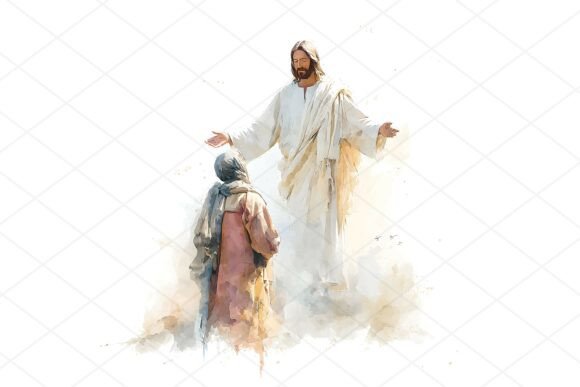
The Jesus Christ Clipart included in this set is remarkably versatile, but its application requires thoughtful consideration of context. These illustrations feature biblical characters rendered in a soft, watercolor style, making them ideal for projects that aim to evoke comfort and tradition. For instance, using these images for baby shower invitations or nursery decor aligns perfectly with the tender aesthetic. However, applying them to corporate religious materials or formal church bulletins might require additional design elements to balance the casual, farmhouse vibe.
Entrepreneurs and small business owners should consider how these images fit their brand identity. If your brand leans towards modern minimalism, the detailed watercolor style might clash unless used sparingly as an accent. Conversely, if your audience appreciates handcrafted, artisanal looks, these cliparts will resonate deeply. Before integrating them into your product line, create mockups to test visual harmony. This proactive approach prevents costly redesigns and ensures that the final product meets customer expectations.
Common Pitfalls in Digital Asset Usage
- Ignoring Licensing Terms: Always review the usage rights. While this is a digital download for personal and commercial use in many cases, ensure you understand any restrictions on resale of the raw files. You are buying the right to use the images in your designs, not to redistribute the clipart itself.
- Overlooking Color Profiles: Watercolor art relies heavily on subtle color gradients. When moving files between different devices or software, color shifts can occur. Calibrate your monitor and check proofs before finalizing prints to ensure the hues remain true to the original artistic intent.
- Neglecting File Organization: With 26 high-resolution files, keeping track of specific characters or scenes can become challenging. Rename files descriptively upon download (e.g., "Jesus_Blessing_Children.jpg") to streamline your workflow and save time during future projects.
Best Practices for Editing and Integration
To get the most out of this Religious Christian Clipart bundle, adopt a systematic editing workflow. Start by importing the JPG into your preferred design software. If transparency is needed, use a reliable background removal tool. Many online services offer free trials, and built-in tools in Adobe Photoshop or Affinity Photo provide precise control. After removing the background, inspect the edges for any white halos. Softening the edges slightly can help the watercolor effect blend more naturally with new backgrounds.
When incorporating these images into digital planners or journals, consider adding subtle shadows or textures behind the clipart to enhance depth. This technique mimics the look of traditional scrapbooking and adds a tactile quality to digital designs. For apparel printing, ensure that the design is centered and scaled appropriately for the garment size. Test prints on fabric scraps can reveal how the watercolor details translate to textile ink, allowing you to adjust contrast or brightness if necessary.
Making an Informed Purchase Decision
Before downloading, ask yourself if the style aligns with your current project needs. The Biblical Characters depicted here are stylized with a specific artistic flair. If you require realistic or traditional iconography, this watercolor approach may not suit your purpose. However, if you seek to add warmth and approachability to your faith-based content, this bundle is an excellent choice. Verify that your software can handle JPG editing efficiently, and ensure you have the storage space for high-resolution files.
Ultimately, the value of this Digital Download lies in its ability to elevate simple designs into heartfelt creations. By understanding the technical requirements and planning your workflow, you can avoid common frustrations and produce stunning visuals. Whether you are a hobbyist creating gifts for family or a marketer developing products for a faith-based audience, these tools empower you to communicate spiritual messages with clarity and beauty. Take the time to experiment with the files, explore different editing techniques, and let the charming aesthetics of the ZohhoHouse collection inspire your next creative endeavor.